Creating believable characters is a cornerstone of modern 3D art. Consequently, the texture of a character's surface plays a vital role. This guide explores realistic character surface texture for texture artists. We will delve into techniques and principles. Therefore, understanding these is crucial for compelling results.
The essence of realism in textures
Realism in textures goes beyond just applying images. It involves understanding how light interacts with surfaces. Moreover, it requires attention to micro-details. These details tell a story about the character and their environment. Thus, artists strive for convincing material representation.
Why realism matters
Realistic textures enhance immersion significantly. They help the audience connect with the character. Furthermore, they add depth and credibility to the visual narrative. In games and films, this is especially important. Therefore, mastering realism is a key skill.
Understanding fundamental surface properties
Modern texturing workflows often use Physically Based Rendering (PBR)[3] principles. This approach mimics real-world light behavior. Therefore, understanding PBR maps is essential. These maps define how a surface looks.
Key PBR maps
Several maps are crucial for PBR texturing. Firstly, the Albedo[1] map defines the base color. It represents the diffuse color of the surface. Secondly, the Roughness map controls how rough or smooth a surface is. This affects light reflection. Thirdly, the Metalness map indicates if a material is metallic or non-metallic. Normal maps[5] add surface detail without extra geometry. Finally, Ambient Occlusion (AO) maps simulate soft shadows in crevices.
The texturing workflow: From reference to render
A structured workflow is vital for creating high-quality textures. It begins with gathering good reference materials. Subsequently, artists move through modeling, UV unwrapping, baking, and texturing stages.
Gathering high-quality references
Good references are invaluable. Artists should collect images of real-world materials and surfaces. For instance, look at skin, fabric, and metal under various lighting conditions. This helps understand how they behave. Consequently, your textures will be more accurate.
Modeling and UV unwrapping considerations
The 3D model itself influences texturing. Good topology is important. Moreover, UV Unwrapping[4] is a critical step. Clean and efficient UVs allow for better texture application and less distortion. Artists should minimize seams and maximize texture space.
Baking essential maps
Baking involves transferring details from a high-poly model to a low-poly model. This process generates maps like Normal, AO, and Curvature. These maps are then used during the texturing phase. Therefore, accurate baking is crucial for detail.
Texturing software choices
Several software options are popular for texturing. Substance Painter is widely used for its PBR capabilities and layering system. Mari is another industry standard, especially for high-resolution assets. Photoshop, combined with plugins, remains a viable option too. Each has its strengths. Thus, the choice depends on the project and artist preference.
Layering techniques for depth
Building textures in layers adds realism. Start with a base material. Then, add details like wear, dirt, and imperfections progressively. Using masks and procedural generators helps create natural variations. This layering mimics how real-world objects acquire surface characteristics over time.
Procedural vs. hand-painted details
A mix of procedural techniques and hand-painting often yields the best results. Procedural tools can quickly generate base details and variations. However, hand-painting allows for artistic control and specific details that procedurals might miss. Therefore, combining both is very effective.
Detailing realistic skin
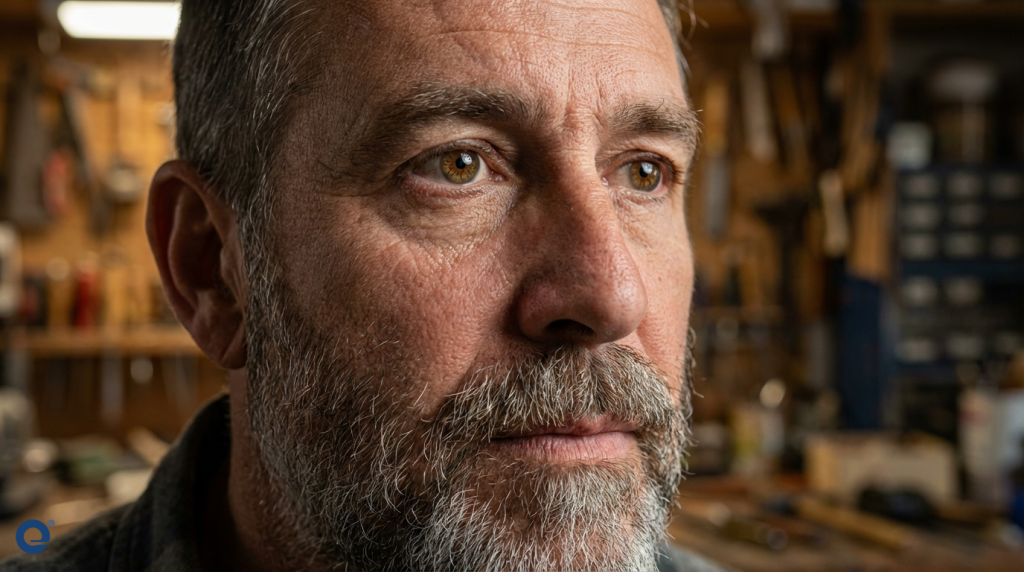
Skin is one of the most complex surfaces to texture. It requires careful attention to color variation, pores, wrinkles, and blemishes. Furthermore, Subsurface Scattering (SSS)[2] is vital for believable skin.
Color zones and variation
Real skin has subtle color variations. For example, areas with more blood flow appear redder. Other areas might have yellow or blue undertones. Artists often use color zone maps to guide this. These variations add life to the skin.
Pores, wrinkles, and imperfections
Micro-details like pores and wrinkles are crucial. Their size and density vary across the face and body. Imperfections such as moles, scars, or freckles also add realism and character. These details should be added thoughtfully.
Subsurface scattering (SSS)
SSS simulates light penetrating the skin's surface and scattering beneath it. This gives skin its characteristic soft look, especially in thinner areas like ears and nostrils. Consequently, SSS is essential for realistic skin rendering.
Texturing hair, fur, and feathers
Hair, fur, and feathers present unique challenges. They are often created using hair cards or geometry strands. Texturing these involves creating maps for color, transparency, and specular highlights. Realism depends on how light interacts with these fine structures. Good reference is key here.
Creating believable clothing and accessories
Clothing and accessories also require careful texturing. The type of fabric dictates its texture. For example, denim looks very different from silk. Weathering and wear patterns should match the character's story and environment. Observing real-world materials is incredibly helpful. Seams, stitching, and folds add another layer of detail.
Fabric types and properties
Different fabrics have distinct weave patterns, roughness, and drape. Understanding these properties is crucial. For instance, leather will have different wear patterns compared to cotton. Artists should study these differences.
Adding wear and tear
Wear and tear tell a story. Faded colors, frays, dirt, and stains make clothing look used and real. The location and intensity of wear should be logical. For example, edges and areas of friction show more wear.
Materials and shaders in rendering
The final look of the textures depends heavily on the materials and shaders used in the render engine. The PBR maps created during texturing are plugged into the shader. The shader then calculates how the surface interacts with light based on these maps. Different render engines might have slightly different shader setups, but the PBR principles remain similar.
Real-time vs. offline rendering
Real-time renderers (like those in game engines) and offline renderers (used in film and animation) handle materials differently due to performance constraints. Real-time engines often use approximations for effects like SSS, while offline renderers can perform more complex calculations. However, the gap is narrowing, and many techniques are shared between them. Texture artists need to be mindful of the target renderer's capabilities and limitations. For instance, texture map sizes and shader complexity might be more restricted in real-time applications. Despite these differences, the fundamental goal of achieving visual fidelity remains.
Optimization techniques
Optimizing textures is crucial, especially for real-time applications. This involves managing texture resolution, file formats, and the number of maps used. Techniques like texture atlasing (packing multiple UV islands into one texture set) are common. Efficient UV packing also plays a big role in optimization.
Texture resolution and memory
Higher resolution textures look better but consume more memory. Artists must balance visual quality with performance budgets. Using lower resolutions for less important or distant objects is a common practice. Moreover, tools like AI-powered upscalers can sometimes help.
File formats and compression
Choosing the right file format and compression settings can significantly reduce file sizes. Formats like DDS are often used in games due to their compression and mipmap support. Lossless formats like PNG are better for source files, while compressed formats are used in the final build.
Common mistakes to avoid
Several common mistakes can detract from realism. Overly uniform textures lack natural variation. Conversely, excessive noise or dirt can look artificial. Ignoring reference often leads to inaccurate material representation. Also, poor UVs can cause visible seams and distortion. Finally, not considering the lighting environment during texturing can result in materials looking wrong in the final scene.
Future trends in texturing
The field of character texturing is constantly evolving. AI and machine learning are playing an increasing role in texture generation and enhancement. Real-time ray tracing is pushing the boundaries of realism in games. Furthermore, proceduralism continues to advance, allowing for more complex and dynamic material creation. Staying updated with these 3D graphics trends is important for artists.
Conclusion
Creating realistic character surface textures is a blend of technical skill and artistic observation. By understanding surface properties, following a structured workflow, and paying attention to detail, texture artists can bring believable and engaging characters to life. Continuous learning and practice are key to mastering this craft.
More Information
- Albedo: In PBR, Albedo represents the base color of a surface, free of lighting or shading information. It's the diffuse color under pure white light, defining what color the material is.
- Subsurface Scattering (SSS): SSS is a light transport mechanism where light penetrates the surface of a translucent object, scatters internally, and exits at a different point. It's crucial for materials like skin, wax, and marble.
- Physically Based Rendering (PBR): PBR is an approach to shading and rendering that aims to simulate the behavior of light in the real world more accurately. It uses properties like albedo, roughness, and metalness to define materials.
- UV Unwrapping: This is the process of flattening a 3D model's surface into a 2D representation (UV map). This 2D map is then used to apply textures accurately onto the 3D object.
- Normal Map: A Normal Map is a type of texture map that simulates high-resolution surface detail on a lower-resolution model. It stores information about the direction of surface normals, faking the way light interacts with fine details.